Data Backup Cube
Auto photo backup, every time they charge.
The Data Backup Cube is a compact MFi-certified adapter that sits between phone and charger. Plug in, and photos & videos back up automatically to a microSD card — no cloud, no subscription, no learning curve. Users supply their own card, which keeps your unit cost the lowest in the category.
- MFi certified
- Lowest unit cost
- Offline · no subscription
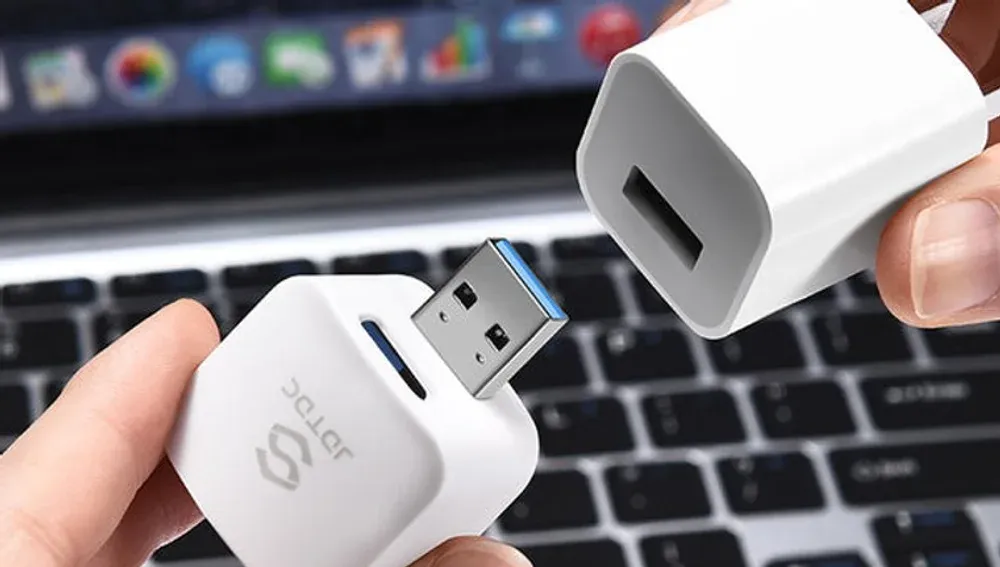
At a glance
- What it is
- Auto photo backup adapter (a.k.a. photo backup cube / data cube)
- How it works
- Backs up new photos & videos automatically while the phone charges
- Storage
- User-supplied microSD card — flexible capacity
- Works with
- iPhone, iPad, Android, Windows, macOS
- Certifications
- Apple MFi · CE · FCC · PSE · RoHS
- Wholesale MOQ
- 2,000 units, factory-direct
Why it sells
Key selling points for distributors
Lowest unit cost in the range
Because storage is user-supplied, the cube is ideal for promotions, carrier giveaways, and high-volume programs where price point decides the deal.
Bundle flexibility
Ship bare for the keenest price, or bundle with a microSD card for higher ticket value and a complete retail box.
MFi-certified — channel-safe
Genuine Apple-licensed components won’t be blocked by iOS updates, and there’s no trademark exposure for your retail channel.
Zero learning curve
Auto-backup on charge means end users do nothing new. Plug in at night; wake up backed up.
Self-developed app
Runs on our own iStore Pro app — MFi certified and copyright-protected. We control the software, so OEM white-labeling is possible.
Doubles as a card reader
On a computer it works as a standard microSD card reader — one more reason customers keep it in daily use.
At a glance
How the Data Backup Cube works
The cube sits in the charging path — wall charger → cube → phone — and backs up new photos and videos automatically while the phone charges. Setup is once; after that it runs itself.
Insert a microSD card
Slide your own microSD card into the cube (the card is user-supplied, so you choose the capacity). Any mainstream 128GB–512GB card covers a typical camera roll.
Plug the cube between charger and phone
Connect the cube to your wall charger, then connect your phone’s cable to the cube. It now sits in the normal charging path with nothing else to rearrange.
Install iStore Pro
Install the MFi-certified iStore Pro app once and grant photo access. The app detects the cube whenever the phone is connected and manages the backup.
Charge — it backs up automatically
Charge your phone as usual and the cube copies new photos and videos incrementally — only files added since the last session. Plug in at night; wake up backed up.
Specifications
Data Backup Cube — technical details
The cube is a converter, not a storage device: customers choose and insert their own microSD card. That keeps the unit cost low, the capacity flexible, and the retail story simple.
What’s in the box
- The Data Backup Cube unit
- Quick-start guide
- Note: a microSD card is not included — users supply their own (this keeps the unit cost lowest).
- Note: a charging cable and wall charger are not included — the cube works with your existing charger.
| Type | Auto backup adapter / converter (storage not included) |
|---|---|
| Storage | User-supplied microSD card — flexible capacity |
| Interface | USB 3.0 |
| Backup trigger | Automatic on charge — incremental (only new photos & videos) |
| App | iStore Pro (MFi certified, self-developed) |
| Compatibility | iOS / iPadOS 10.0+ · Android 6.0+ · macOS 11.0+ |
| Certifications | Apple MFi · CE · FCC · PSE · RoHS |
| Warranty | Standard limited warranty — terms per purchase agreement |
| MOQ | 2,000 units |
| Customization | Logo, packaging, color, manual language, app white-label |
At a glance
Data Backup Cube vs cloud storage
The cube is a one-time purchase that keeps photos offline and in your customer’s hand; cloud storage is an ongoing subscription that keeps them on a provider’s servers. Here is the practical comparison.
| Data Backup Cube | Cloud storage | |
|---|---|---|
| Cost model | One-time purchase (+ a microSD card) | Monthly / annual subscription |
| Recurring fee | None | Yes — forever, rising with library size |
| Privacy | Photos stay offline, in your hand | Photos stored on provider servers |
| Internet required | No — backs up over the cable | Yes — for backup and retrieval |
| Ownership | You own the device and the card | Access ends if you stop paying |
| Setup | Once, then automatic on charge | Account, payment, and ongoing management |
Where it sells
Channels & use cases
Make it yours
OEM & ODM customization options
Build the Data Backup Cube into your own brand — from a logo print to a fully white-labeled backup app, direct from the source factory.
Volume pricing — request a wholesale quote.
Frequently asked questions
What is a data backup cube?
A data backup cube is a small adapter that sits between a phone and its charger. While the phone charges, the cube automatically copies new photos and videos to a microSD card — offline backup with no cloud account or subscription.
Does the Data Backup Cube include storage?
No. It is a converter: end users insert their own microSD card. For distributors this means the lowest unit cost in the category, plus the option to bundle a card for higher ticket value.
Is it MFi certified?
Yes. MemoryKept is an Apple MFi-licensed manufacturer (PPID 252080-0011 / 252080-286382), so the cube uses genuine Apple-licensed components and stays compatible through iOS updates.
What is the wholesale MOQ and can I customize it?
MOQ starts at 2,000 units, factory-direct. Logo, packaging, housing color, manual language, and even the backup app can be customized (OEM/ODM).
Add the Data Backup Cube to your catalog
Tell us your market and target volume — we’ll send factory-direct pricing and samples.